CRISLAN GUIDE · WINDOWS
Remote Desktop for Small Businesses — Access Your Windows PCs with CrisLan
When the computer you need is at reception, in the workshop or in another office, CrisLan lets you view its existing Windows session from your own PC. Start by testing your everyday workflow before choosing Host licences.
Where remote access fits into a working day
Help a colleague at reception with a Windows application, check progress on a workshop PC, or open a file on an office computer you are authorised to use. These are example uses, not customer testimonials.
CrisLan shows the existing desktop session. Every connection starts in view-only mode; choose Take control when you need to interact. Coordinate with anyone working at that PC, since you are using the same session.
Example: one Viewer and five Host PCs
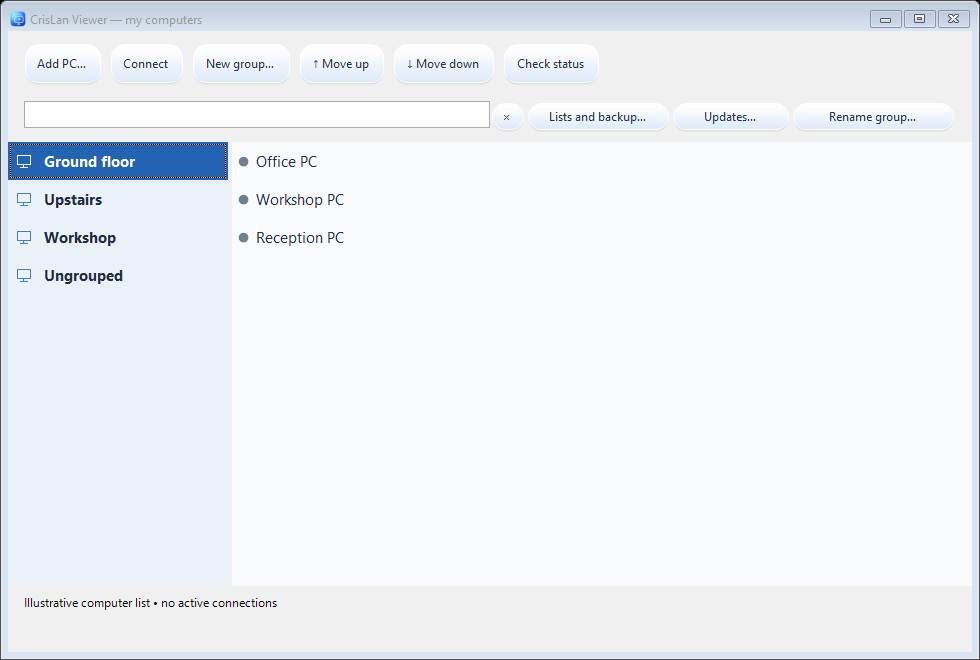
Imagine a small business with Reception, Workshop, Office 1, Office 2 and Stockroom PCs. Install Host on those five Windows computers and Viewer on the computer used to access them. Pair each Host separately, then organise the saved entries into a recognisable group.
Open the connections you need in separate Viewer windows and move between them without closing the other sessions. Five Host PCs require five Host licences after their trials; the Viewer is free. The illustration below shows the real group interface, not five measured live connections.
In the office or away from it
On the same local network, Host and Viewer connect without a separate central CrisLan server. On a trusted network, the Host must use the Windows Private or Domain profile, with the firewall kept enabled.
For access from another network, the tested method uses NetBird installed and configured separately on both PCs. Enter the Host NetBird IP in Viewer. CrisLan does not include a managed cloud connection service; use the linked NetBird guide for setup and provider plan limits.
Choose licences for the PCs you access
Host licences use a one-time payment for CrisLan 1.x. Updates within the 1.x series are included when available; a future 2.0 upgrade is optional and paid. There is no CrisLan subscription for your licensed 1.x version.
Packages cover 1, 5, 10 or 25 Host PCs. You can buy one additional Host licence separately as your needs grow. Check current prices and licence conditions on the product page rather than assuming a package guarantees a particular frame rate.
Try your actual workflow before buying
Start with one Host and the free Viewer. Use the 14-day Host trial to check installation, pairing, image quality and the tasks your business needs. Then add your other PCs gradually and try the number of concurrent windows you expect to use.
The Host PCs must be powered on, reachable and have CrisLan access enabled. Performance depends on the Host, Viewer and network; a Host desktop resolution of up to Full HD (1920 × 1080) is recommended. More open sessions use more resources.
Only enrol Viewers authorised to access your business computers. Revoke access in Host when it is no longer needed. Product terms and territorial restrictions apply to trials as well as commercial use.
Try CrisLan Host free for 14 days
Complete installation and pairing guide
Download Host and Viewer · Prices and licences
Use CrisLan only on computers you are authorised to access. Product terms and territorial restrictions apply. Terms · Territorial restrictions